Nano Banana 2.1 vs Nano Banana 2: Half the Price, Tested on Real Expert Photos
Google shipped Nano Banana 2.1 at half the price of Nano Banana 2. We ran both on our own pipeline with the same prompts and the same reference faces, judged the results blind, and made 2.1 the default for every ppl.studio account.
7 min read
Nano Banana is Google's name for the Gemini image models: the original Nano Banana (Gemini 2.5 Flash Image), then Nano Banana Pro, then Nano Banana 2 (Gemini 3.1 Flash Image), and now Nano Banana 2.1. We make every Expert photo, carousel slide and video first frame on ppl.studio with these models, so a new one is a practical question for us: is it cheaper, does it keep the same face, and does it spell the words we ask for?
The Short Version
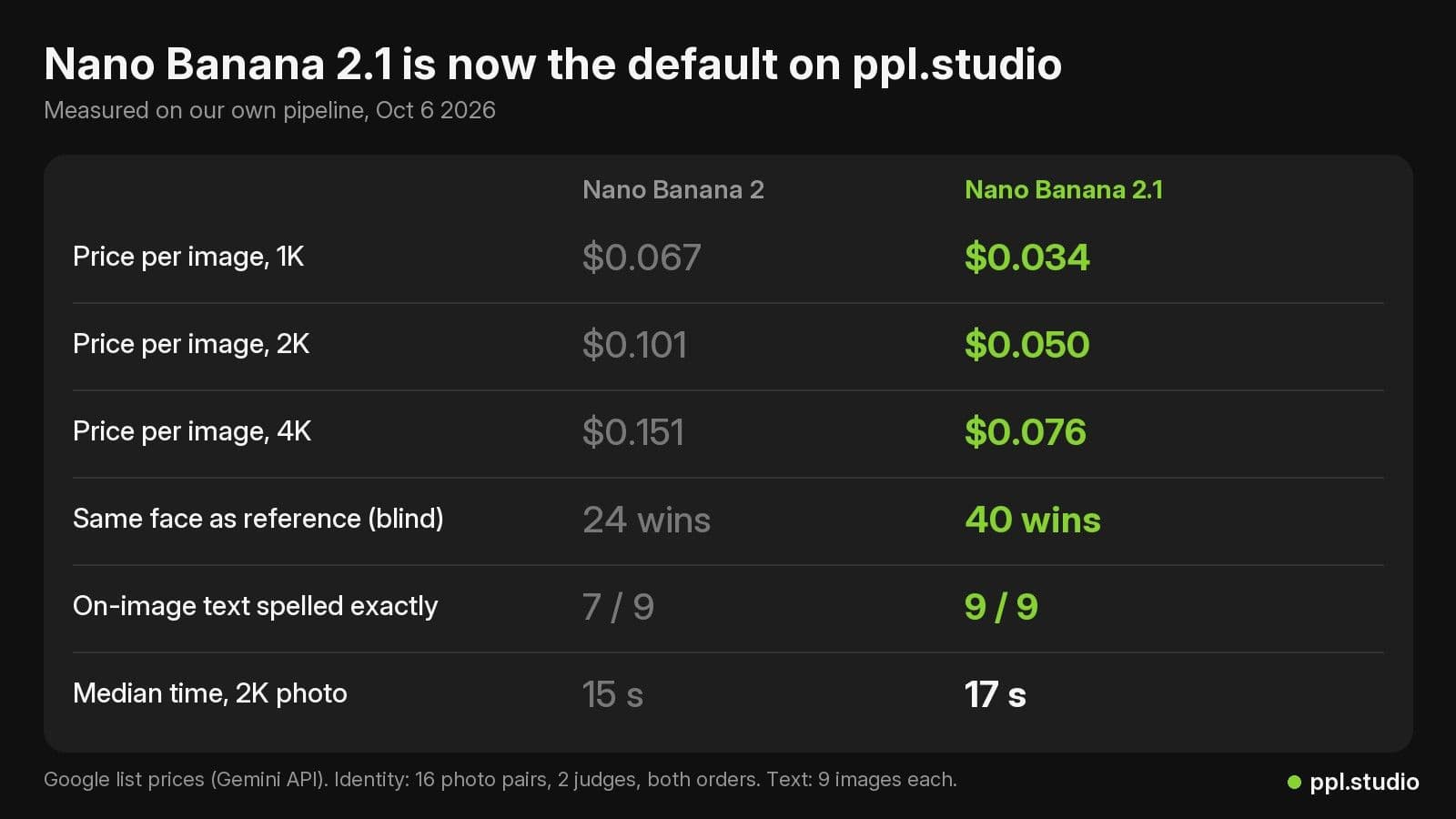
- Half the price. $0.050 for a 2K image instead of $0.101, on Google's list prices.
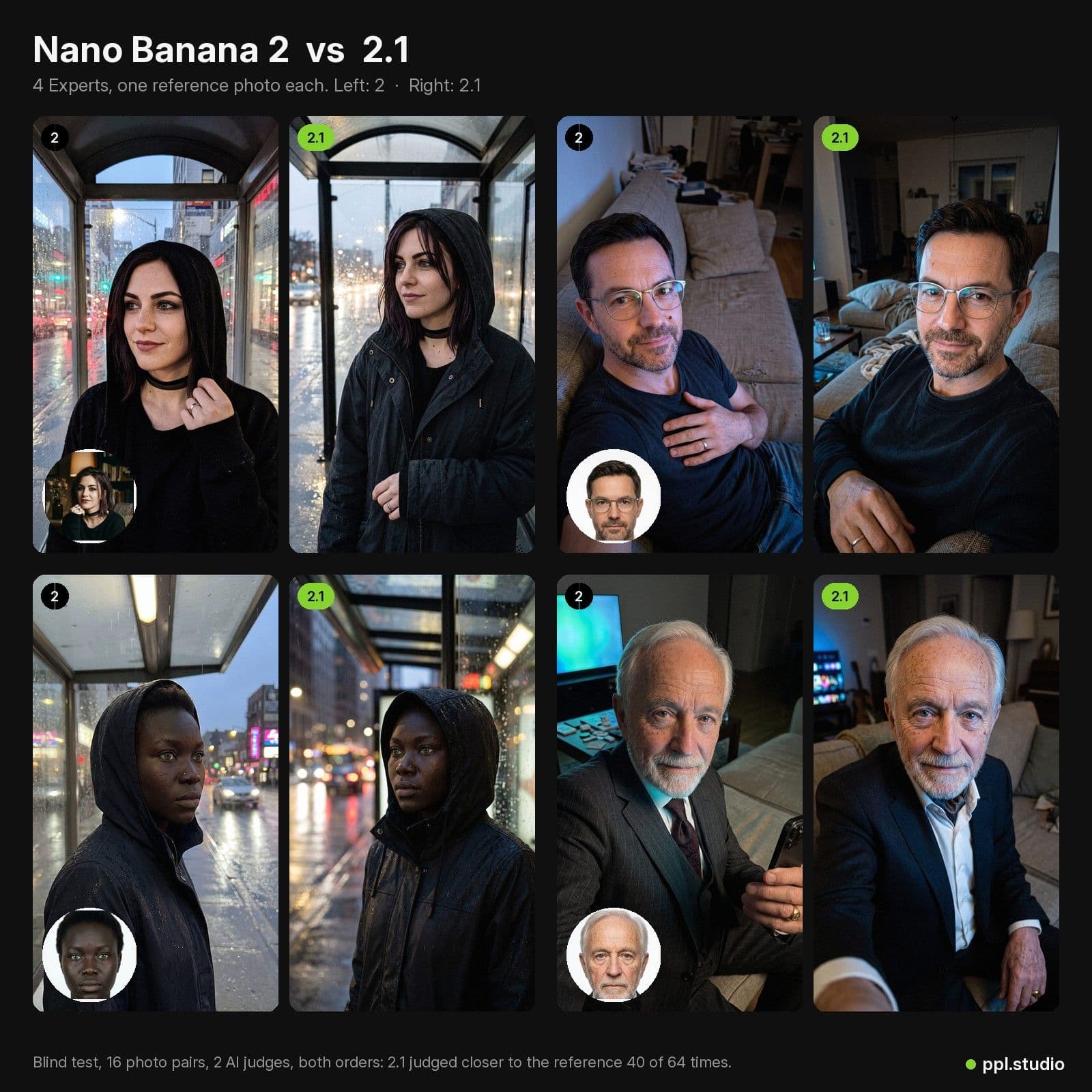
- Faces held up. In a blind test, two AI judges picked the 2.1 photo as closer to the reference face 40 times out of 64.
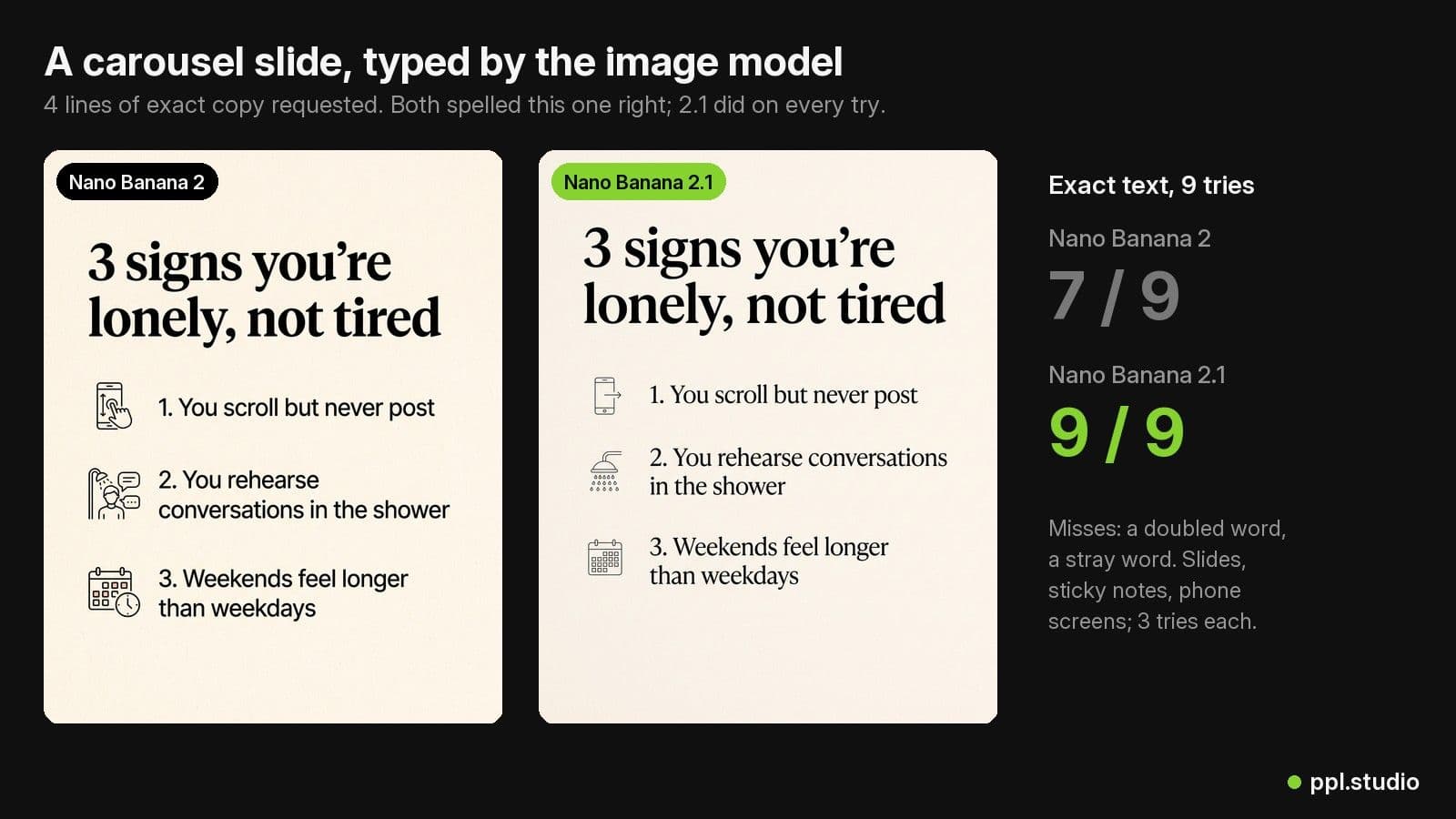
- Text came out exact. 9 of 9 text images spelled exactly, against 7 of 9 for Nano Banana 2.
- About 2 seconds slower. 17 s vs 15 s for a median 2K photo, at the thinking level we use.
- Already on. Nano Banana 2.1 is the default on ppl.studio since October 6, 2026. Nothing to change.
What Is New in Nano Banana 2.1
Nano Banana 2.1 (gemini-nano-banana-2.1) is generally available on the Gemini API. Google lists better image quality and realism, more accurate text rendering, no more tiling artifacts on wide and panoramic shapes, new extreme aspect ratios (1:4, 4:1, 1:8, 8:1) and up to 14 reference images, of which up to 4 can be characters and up to 10 objects. It renders at 1K, 2K or 4K; unlike Nano Banana 2 there is no 0.5K size.
It also thinks before it draws, at a configurable level: minimal, medium (the default) or high. Thinking tokens are billed as text, so the level is a cost and speed setting as much as a quality one. More on that below.
Price Per Image
| Size | Nano Banana 2 | Nano Banana 2.1 |
|---|---|---|
| 1K | $0.067 | $0.034 |
| 2K (our default for photos and slides) | $0.101 | $0.050 |
| 4K | $0.151 | $0.076 |
These are Google's standard Gemini API list prices; the Batch API halves both. On ppl.studio you generate on your own Gemini key, so the saving shows up directly on your Google bill. A 6-slide carousel at 2K drops from about $0.61 to about $0.30 in image cost.
How We Tested
We did not use showcase prompts. We used our production code path: the same prompt builder, realism instructions and reference handling that make every Expert photo in the app.
- Subjects: four of our most-used AI Experts, chosen to differ in age, gender and skin tone, each with one reference (passport) photo.
- Scenes: four candid, low-light phone scenes (dinner alone at the kitchen table, a tired selfie on the couch, a rainy bus stop, lying in bed). Dim light is where faces drift.
- Arms: Nano Banana 2, Nano Banana 2 again (a control), Nano Banana 2.1 at Google's default thinking, and Nano Banana 2.1 at minimal thinking. 64 images, one take each, 2K, 9:16.
- Judging: blind pairwise. Each judge saw the reference and two unlabeled photos and picked the one that is more convincingly the same person, ignoring scene, light and clothes. Two judge models (Gemini 3.8 Flash and Gemini 3.1 Pro), each pair shown in both orders.
The control matters. AI judges are noisy, so we also pitted Nano Banana 2 against itself: a fair judge should split those pairs roughly evenly. It came out 29 to 35, so a 40 to 24 result is a real lean, not judge bias.
Result 1: Same Face, Half the Price
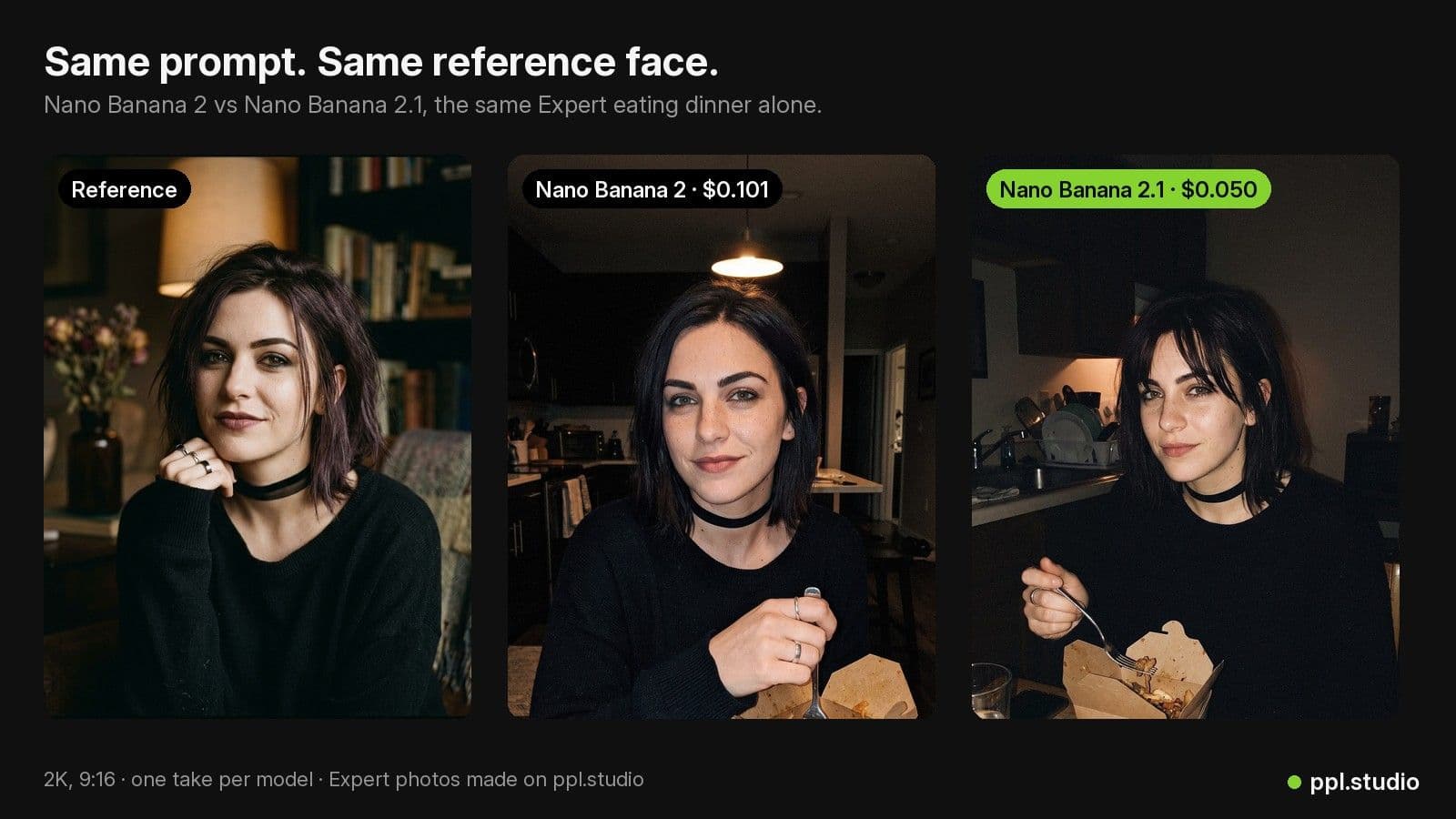
Across the 64 judgments, the Nano Banana 2.1 photo was picked as closer to the reference 40 times, Nano Banana 2 24 times. Both judges leaned the same way. With 16 photo pairs that is not a landslide (p ≈ 0.06), so the honest reading is: 2.1 keeps faces at least as well as Nano Banana 2, probably a little better.
Looking at the photos ourselves, both models kept every Expert recognizable, including small signature details such as a choker or a pair of glasses. The difference we noticed most was framing: 2.1 tends to show more of the room around the person, which reads more like a real phone photo and less like a portrait.
Result 2: Text You Can Actually Post
Words on images matter for carousels, infographics and app screens. We asked each model for nine images with exact copy in them (a carousel slide with a headline and three numbered lines, a handwritten sticky note, and a message on a phone lock screen, three tries each) and checked every image with two OCR passes.
- Nano Banana 2.1: 9 of 9 spelled exactly.
- Nano Banana 2: 7 of 9. One sticky note wrote “eating” twice; one slide picked up a stray word.
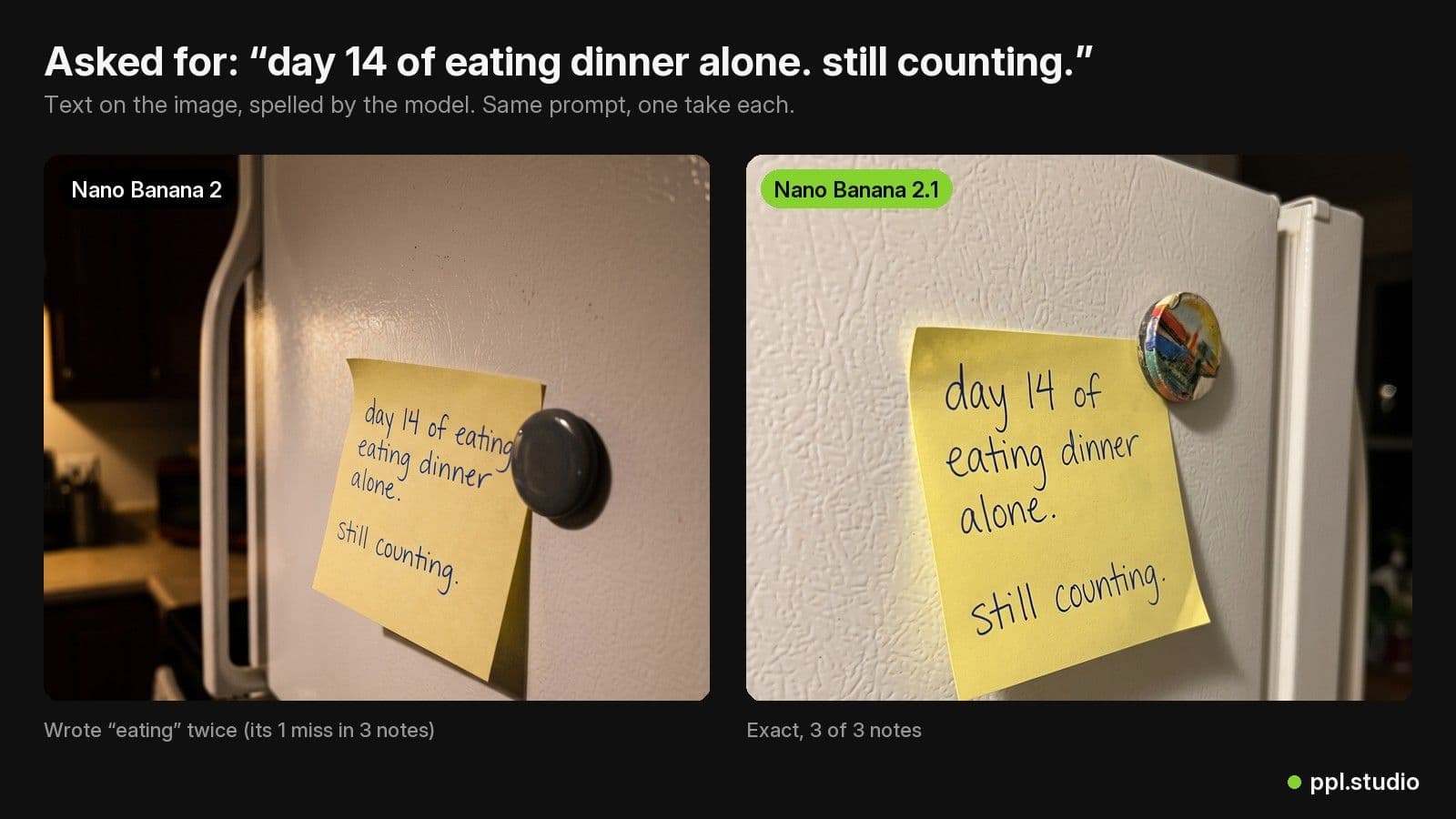
Nano Banana 2 is good at text most of the time; the misses are occasional. But an occasional doubled word is exactly the kind of mistake that gets a slide reposted with the wrong caption, so fewer of them is worth having.
Result 3: Thinking Level, Speed and the Setting We Chose
At Google's default (medium) thinking, Nano Banana 2.1 spent roughly 800 to 1,400 thought tokens per image and the median 2K photo took 24 seconds, against 15 for Nano Banana 2. At minimal thinking it took 17 seconds and skipped most of those tokens.
Minimal did not cost anything we could measure: on faces, minimal against medium came out 37 to 27 (no real difference), and both spelled all text exactly. So ppl.studio runs Nano Banana 2.1 at minimal thinking. It is faster and cheaper, with no loss we could find on faces or text.
What Changes for You on ppl.studio
- Nothing to do. If you never picked an image model, your account uses Nano Banana 2.1 now: Expert photos, carousel slides, product shots and video first frames.
- Your Experts stay your Experts. The reference photo is still sent with every image as the face to keep.
- Want the old look? Under Account, “Model for images”, you can pick Nano Banana 2 again, or Lite (cheapest, 1K only) or Pro (for the hardest compositions).
- Cost estimates in the app now price images at the Nano Banana 2.1 rate.
New to the model picker or Experts? The Nano Banana 2.1 guide walks through it step by step, and our Nano Banana prompt guide covers how to write the prompts.
When to Pick a Different Model
| Model | Price (2K) | Use it for |
|---|---|---|
| Nano Banana 2.1 (default) | $0.050 | Everything: Expert photos, slides, product shots, frames |
| Nano Banana 2 | $0.101 | If you prefer its tighter, portrait-style framing |
| Lite | $0.034 (1K only) | Cheap drafts where 1K is enough |
| Pro | $0.134 | The hardest compositions, when price matters less |
Limits of This Test
Sixteen photo pairs and nine text images per model is a quick, honest check, not a benchmark. The judges were AI models, not people, and every scene was a dim indoor or night shot. We will keep watching real runs in the app; if 2.1 turns out worse at something we did not test, we will say so here and change the default back.
Frequently Asked Questions
What is Nano Banana 2.1?
Nano Banana 2.1 (model id gemini-nano-banana-2.1) is Google's newest Gemini image model and the successor to Nano Banana 2 (gemini-3.1-flash-image). It is generally available on the Gemini API, renders at 1K, 2K or 4K, takes up to 14 reference images and costs $0.034, $0.050 or $0.076 per image at those sizes.
Is Nano Banana 2.1 cheaper than Nano Banana 2?
Yes, half the price at every size on Google's list prices: $0.050 vs $0.101 for a 2K image, $0.034 vs $0.067 at 1K and $0.076 vs $0.151 at 4K. 2.1 also bills a few hundred text tokens of thinking per image; at the minimal thinking level ppl.studio uses, that adds about $0.002.
Does Nano Banana 2.1 keep a character's face consistent?
In our blind test of 16 photo pairs (4 Experts, 4 scenes each), two AI judges picked the Nano Banana 2.1 photo as closer to the reference face 40 times out of 64 and the Nano Banana 2 photo 24 times. A same-model control came out 29 to 35, so the judges were not simply biased. It is a small test: read it as at least as good, probably a little better.
Is Nano Banana 2.1 better at text in images?
In our test, yes. We asked each model for 9 images with exact words in them (a carousel slide, a handwritten sticky note and a phone lock screen, three tries each) and checked them with OCR. Nano Banana 2.1 spelled all 9 exactly; Nano Banana 2 got 7, with one doubled word and one stray word.
Is Nano Banana 2.1 slower?
A little. The median 2K photo took 17 seconds on Nano Banana 2.1 at minimal thinking and 15 seconds on Nano Banana 2. At Google's default thinking level (medium) 2.1 took 24 seconds without looking better in our test, which is why ppl.studio runs it at minimal.
Do I need to change anything in ppl.studio?
No. If you never picked an image model, your account now uses Nano Banana 2.1. If you prefer Nano Banana 2, choose it under Account, Model for images; Lite and Pro are still there too.
Make Expert photos on Nano Banana 2.1
Pick an AI Expert, drop in your product and generate. Nano Banana 2.1 is already the default; you pay Google directly on your own Gemini key.
Start free with ppl.studio10 free photos · no credit card required
Founder of ppl.studio. Building AI tools for product marketing teams who need visual content at scale without the production overhead.