How to Use Nano Banana 2.1 in ppl.studio
Since October 6, 2026, new images in ppl.studio are drawn by Google's Nano Banana 2.1 unless you picked another model. It costs half what Nano Banana 2 did per image, at every size. Here's how to check your setup, when another model makes sense, and what each image costs.
5 min read

What changed, and why it's the default
Nano Banana is Google's name for Gemini's image models, not a separate tool: the original Nano Banana (Gemini 2.5 Flash Image), then Nano Banana Pro (Gemini 3 Pro Image), then Nano Banana 2 (Gemini 3.1 Flash Image), and now Nano Banana 2.1 (gemini-nano-banana-2.1), which is generally available. Same Gemini API, same key. See the Nano Banana glossary entry for the family in one place.
Until October 6, the default image model in ppl.studio (labelled “Basic”) was Nano Banana 2. Basic is now Nano Banana 2.1, for three reasons:
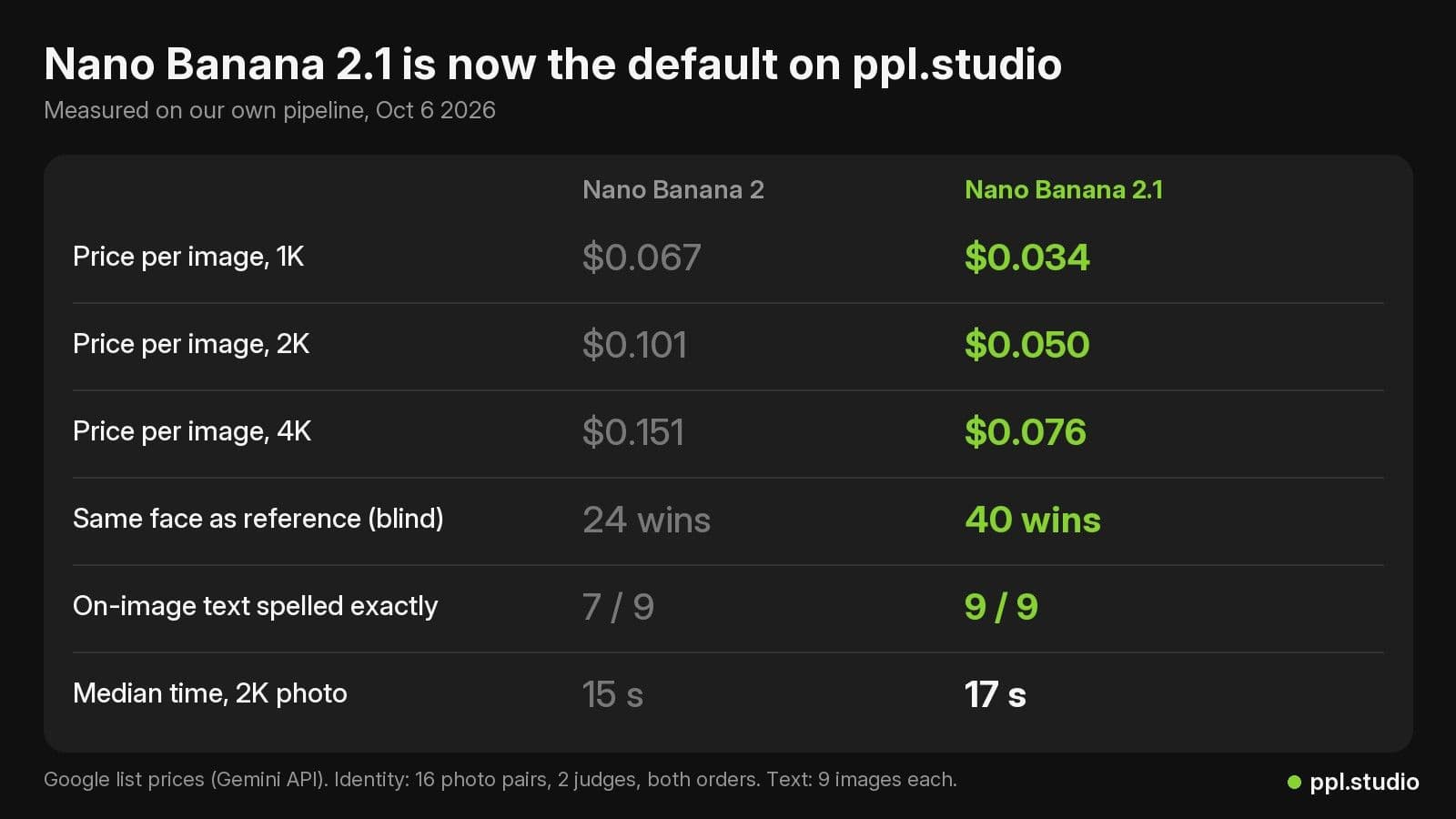
- Price. $0.034 per image at 1K, $0.050 at 2K and $0.076 at 4K, against $0.067, $0.101 and $0.151 for Nano Banana 2. Half, at every size.
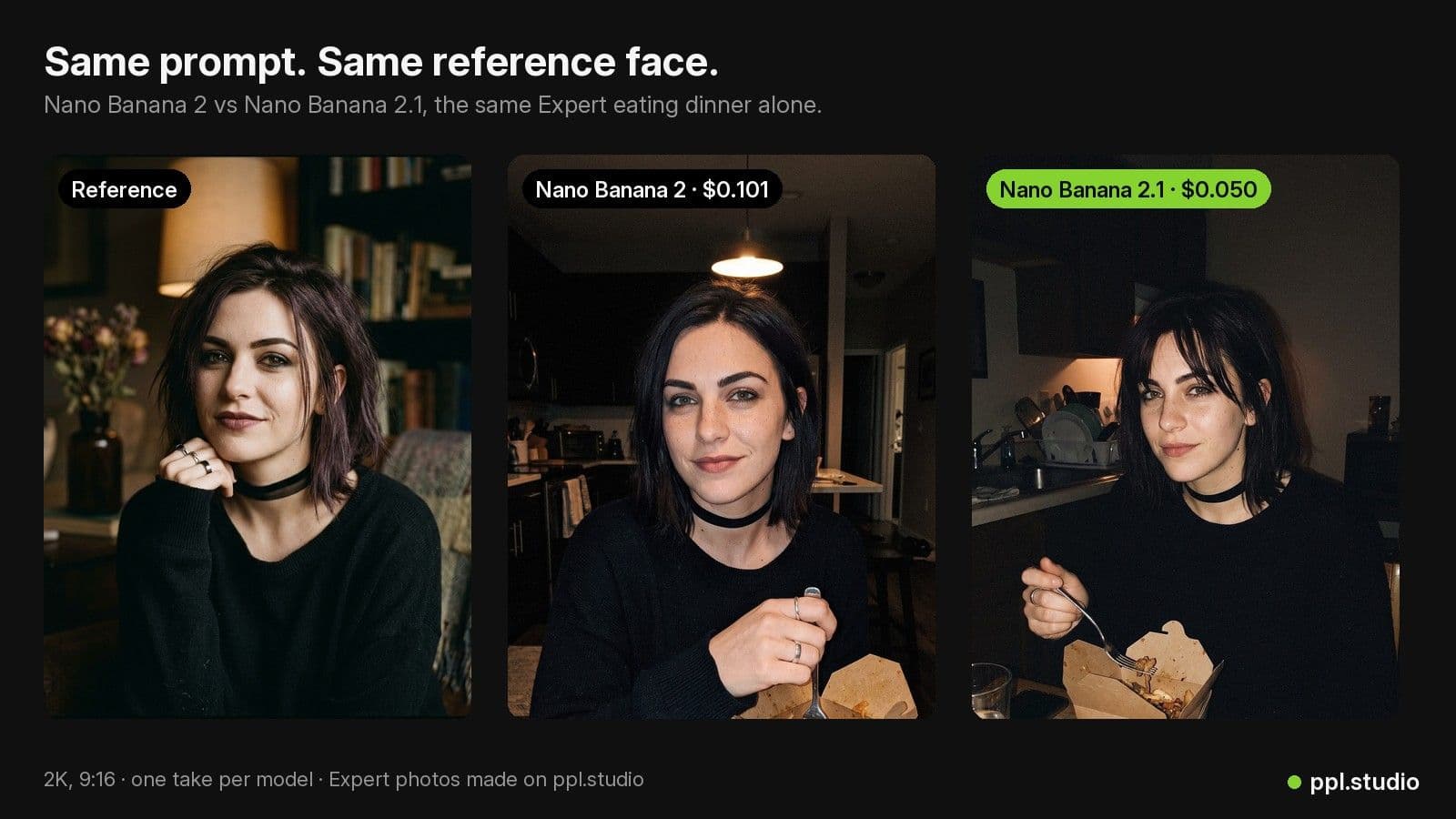
- Faces. In a blind test on our Experts' reference photos, it kept the face at least as well as Nano Banana 2.
- Text. It spelled the exact words we asked for on every image in our check; Nano Banana 2 slipped twice.
Other changes worth knowing: 2.1 renders at 1K, 2K or 4K (there is no 0.5K size), accepts up to 14 reference images (up to 4 characters and 10 objects), no longer tiles on wide and panoramic ratios, and adds 1:4, 4:1, 1:8 and 8:1. Every ratio ppl.studio uses (9:16, 16:9, 1:1, 4:5, 3:4, 2:3, 21:9) renders on it. It also thinks before it draws. Google's default is “medium” thinking; ppl.studio runs it at “minimal”, which takes about 17 seconds for a 2K photo instead of 24.
Step 1: Connect your Gemini key
ppl.studio generates images on your own Gemini API key, so the price cut lands on your Google bill rather than ours. Open the Account page and find the card Configure your Gemini API key. If you don't have a key yet, the card links to Google AI Studio and walks you through creating one. Paste it, click Verify key if you want to test it, then Save.
Already connected a key? Nothing to redo. The model change happens on our side.
Step 2: Check “Model for images”
With a key saved, the same card shows a Model for images menu. Each option lists its label and the Gemini model id behind it:
- Lite (
gemini-3.1-flash-lite-image): $0.034 per image, 1K only. - Basic (
gemini-nano-banana-2.1): Nano Banana 2.1, the default. - Nano Banana 2 (
gemini-3.1-flash-image): the previous default, kept for anyone who prefers it. - Pro (
gemini-3-pro-image-preview): Nano Banana Pro, $0.134 per image at 1K or 2K and $0.24 at 4K.
If you never picked a model, you follow the default automatically and are already on 2.1. If the menu shows something other than Basic, that is a choice saved on your account; pick Basic to move to 2.1.
When another model makes sense:
- Lite for the cheapest drafts, when 1K is enough and you will redo the keepers later.
- Pro for the hardest compositions, where getting it right matters more than paying $0.134 per image instead of $0.050 at 2K.
- Nano Banana 2 if you simply prefer its look on your Experts. It still works; it just costs twice as much.
A switch applies to your next generation. Images you already made stay as they are.
Step 3: Make Expert photos with a reference face
Every Expert has a passport photo: the face, collarbone up, on white. ppl.studio sends it with each generation as the identity reference, so the same person shows up in every scene. 2.1 takes up to 14 reference images, which leaves room for an Expert's face and your product photos in one request.
- Start from a clean passport photo. Front-facing, evenly lit, nothing covering the face. The model can only keep what it can see.
- Describe the scene, not the face. The photo carries the identity. Spend the prompt on place, light, wardrobe and what the Expert is doing; words describing a different face pull against the reference.
- Judge a set, not one image. Generate the same Expert in a few scenes and look at them side by side. Drift is easier to spot in a grid.
New to Experts? Start with how to create your first AI Expert.
Step 4: Put words on images
Carousel slides, infographics, a sticky note in a scene, a phone lock screen: any image where the words have to be exactly right. This is where 2.1 differs most from Nano Banana 2. In our check it spelled the requested text exactly on 9 of 9 images; Nano Banana 2 got 7 of 9, with a doubled word on one and a stray word on another.
- Keep on-image copy short. A headline and a line or two per slide. The less text, the less there is to get wrong, and the easier it reads on a phone.
- Give the exact words in quotes. Spell out what should appear, letter for letter, rather than describing it.
- Proofread every image before it goes out. Nine images per model is a small test. When one slide is off, regenerate that slide rather than the whole set.
For building multi-slide posts, see the storyboards guide.
Step 5: Know the cost
These are Google's list prices per image on the Gemini API, billed to your own key:
| Model | 1K | 2K | 4K |
|---|---|---|---|
| Lite | $0.034 | – | – |
| Basic: Nano Banana 2.1 (default) | $0.034 | $0.050 | $0.076 |
| Nano Banana 2 | $0.067 | $0.101 | $0.151 |
| Pro (Nano Banana Pro) | $0.134 | $0.134 | $0.24 |
Photos render at 2K by default, so a photo on 2.1 costs $0.050 instead of $0.101: 100 photos come to $5.00 rather than $10.10. Video first frames render at 1K, so each costs $0.034 instead of $0.067. Google's Batch API halves both models' prices, but ppl.studio doesn't use it, so the list prices above are the ones that apply.
What we measured
On October 6, 2026 we ran both models through our own pipeline with the same prompts and our Experts' reference photos.
- Identity. 16 photo pairs (4 Experts in 4 scenes each), shown blind to two AI judges (Gemini 3.8 Flash and Gemini 3.1 Pro) in both image orders: 64 judgments. Nano Banana 2.1 was judged closer to the reference face 40 times, Nano Banana 2 24 times. When both images came from the same model, the judges split 29 to 35, close to even, so the gap isn't the judges favouring one side.
- On-image text. 9 images per model (a carousel slide, a sticky note and a phone lock screen, 3 tries each), checked with OCR. Nano Banana 2.1 spelled 9 of 9 exactly; Nano Banana 2 spelled 7 of 9.
- Speed. Median time for a 2K photo: 15 seconds on Nano Banana 2, 17 seconds on 2.1 at minimal thinking, 24 seconds on 2.1 at Google's default medium thinking.
- Ratios. Every aspect ratio ppl.studio uses rendered on 2.1.
The limits are real. Sixteen pairs is a small test, the judges were AI models rather than people, the text check is nine images per model, and 2.1 is about 2 seconds slower per photo. It was enough to make 2.1 the default at half the price, not enough to call it better at everything. The full comparison, with side-by-side images, is in Nano Banana 2.1 vs Nano Banana 2: half the price, tested on real Expert photos.
Frequently asked questions
Do I need to change anything to use Nano Banana 2.1?
No. If you never picked an image model, your account follows the default, which is Nano Banana 2.1 since October 6, 2026. To be sure, open Account and check that Model for images on the Gemini key card says Basic.
Will my Experts look different?
The face comes from your Expert's passport photo, which is sent with every generation as the identity reference. In our blind test, two AI judges picked Nano Banana 2.1 as closer to the reference face 40 times out of 64, against 24 for Nano Banana 2. Images you already made do not change; only new generations use the new model. If you prefer Nano Banana 2's look, you can switch back.
Is Nano Banana 2.1 cheaper than Nano Banana 2?
Yes, half the price per image at every size: $0.034 at 1K, $0.050 at 2K and $0.076 at 4K, against $0.067, $0.101 and $0.151 for Nano Banana 2 (Google's Gemini API list prices). You generate on your own Gemini key, so the saving lands on your Google bill.
Can I go back to Nano Banana 2?
Yes. On the Account page, open the Gemini key card and choose Nano Banana 2 under Model for images. Lite and Pro are there too. The choice applies to your next generation.
Does Nano Banana 2.1 work for videos?
The first frame of a video is drawn by the image model at 1K, so it uses Nano Banana 2.1 by default and costs $0.034 instead of $0.067. The motion itself comes from the video model, which this change does not touch.
What about the Gemini 2.5 Flash Image shutdown?
Google shut down Gemini 2.5 Flash Image, the original Nano Banana, on October 2, 2026. ppl.studio no longer uses it: the default is Nano Banana 2.1, and a Lite choice saved back when Lite meant that model now runs today's Lite model. You do not need to do anything.
Make your next Expert photo on Nano Banana 2.1
Connect your Gemini key and generate. Half Nano Banana 2's price per image, billed to your own Google account.
Open ppl.studioFounder of ppl.studio. Building AI tools for product marketing teams who need visual content at scale without the production overhead.